
How to Use GLM Image in 2026: The Ultimate Guide to Cognitive AI Generation
Author: GLM Image Team
Last Updated: January 15, 2026
Category: Tutorials / AI Image Generation
Introduction
In the rapidly evolving landscape of 2026, the definition of a "good" AI image generator has shifted. It is no longer just about artistic style or lighting; the new battleground is semantic accuracy and perfect text rendering.
If you have ever struggled with AI models that generate beautiful art but fail to spell a simple brand name, or "hallucinate" incorrect details in a scientific diagram, GLM Image is the solution you have been waiting for.
Based on the revolutionary hybrid architecture developed by Z.ai (Zhipu AI) and Tsinghua KEG, GLM-Image is not just a diffusion model—it is a "Cognitive Generator." By combining a 9B Autoregressive (AR) brain with a 7B Diffusion Decoder (DiT), it bridges the gap between complex instruction following and high-fidelity visuals.
This guide will walk you through how to master GLM Image on glmimg.net, from generating dense-text posters to precise image editing.
Why Choose GLM Image in 2026?
Before diving into the tutorial, it is crucial to understand why professionals are switching to GLM Image this year. While models like Flux or Midjourney excel at aesthetics, GLM Image solves three specific industrial pain points:
- SOTA Text Rendering: Thanks to its specialized Glyph Encoder, GLM Image minimizes "gibberish" text. It ranks #1 in open-source benchmarks like CVTG-2K, making it capable of rendering coherent sentences and complex Chinese characters directly inside images.
- Cognitive Understanding: The AR module (initialized from GLM-4-9B) understands logic. It can generate "knowledge-intensive" content, such as accurate flowcharts, recipe guides, or biological diagrams, where spatial logic matters as much as beauty.
- Hybrid Architecture: It uses a "Brain + Artist" approach. The AR model plans the global layout (composition), and the DiT decoder fills in the high-frequency details (texture), offering the best of both worlds.
Getting Started: Prerequisites & Access
Running GLM-Image locally is resource-intensive due to its massive 16B parameter size.
- Local Hardware Requirements: A GPU with at least 80GB VRAM (e.g., NVIDIA H100/A100) is recommended for decent inference speeds.
- The Accessible Solution: For most users, the most efficient way to use this model is via our cloud-based platform at glmimg.net. We handle the heavy compute, allowing you to generate 2048px images from any device.
Step-by-Step Guide: Text-to-Image Generation
The most powerful feature of GLM Image is generating visuals that contain specific text. Here is how to do it correctly.
Step 1: The Setup
Navigate to the "Generate" tab on glmimg.net. Ensure your settings are optimized:
- Resolution: Select 1K (default) or 2K (premium).
- Note: GLM Image supports resolutions up to
2048x2048, but ensure dimensions are divisible by 32.
Step 2: Crafting the Prompt (The "Quotes" Rule)
GLM Image follows instructions strictly. Crucial Rule: Always enclose the text you want to appear in the image within double quotation marks.
Bad Prompt:
A coffee shop poster saying fresh coffee served here.
Good GLM Prompt:
A vintage style commercial poster for a coffee shop. The center features a steaming cup of latte art. At the top, bold elegant white text reads "Fresh Coffee". At the bottom, a smaller subtitle reads "Served Daily since 2026". The background is a dark wood texture.
Step 3: Generate & Refine
Click Start Generating. The AR module will first plan the layout to ensure the text fits logically within the composition, then the Diffusion module will render the realistic textures.
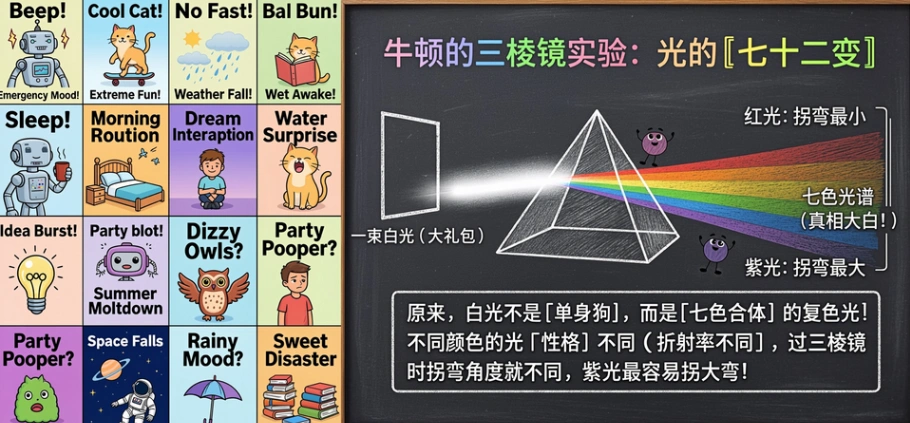 Alt text: An English word list and blackboard teaching for physics courses generated by GLM-Image, showing the correct spelling of text elements.
Advanced Tutorial: Image-to-Image (I2I) Editing
GLM Image is also a robust AI image editor. Unlike simple filters, it uses block-causal attention to preserve the identity of your subject while changing the environment or style.
Scenario: Changing the Background while Keeping the Product
Suppose you have a product shot of a sneaker on a white background and want to move it to a street scene.
- Upload Reference: Upload your original image in the "Image-to-Image" section.
- Input Prompt: Describe the new scene fully.
"A high-tech sneaker placed on a wet neon-lit cyberpunk street at night. Reflections on the ground."
- Adjust Guidance Scale:
- Low (3-5): The AI takes more creative liberty (good for style transfer).
- High (7-10): The AI sticks strictly to your prompt but tries harder to preserve the original structure.
- Generate: The model uses the reference image's high-frequency details to keep the sneaker looking like your sneaker, while repainting the rest.
Pro Tip: Knowledge-Intensive Prompts
In 2026, we are moving towards "Cognitive Generation." GLM Image excels at complex, logic-based requests that would confuse other models.
Try this Recipe Card Template:
"A vertical infographic illustration of a Strawberry Cake recipe. Top: Title text 'Strawberry Delight'. Middle: An exploded view diagram of the cake layers showing 'Sponge', 'Cream', and 'Fruit'. Bottom: Step-by-step icons. The style is clean, vector art with pastel colors."
Why this works: The AR component understands the sequence and labeling logic, ensuring the labels point to the correct layers—something pure diffusion models struggle with.
Limitations & Best Practices
To maintain transparency and trust (E-E-A-T), here are current limitations to be aware of:
- Inference Speed: Due to the hybrid architecture, generation might take slightly longer than lightweight models like SDXL Turbo. Quality takes time.
- Resolution Constraints: Always ensure your custom resolutions are multiples of 32, or the generation may fail.
- Prompt Length: While it supports long contexts, concise and structured descriptions often yield better results than rambling paragraphs.
FAQ: GLM Image in 2026
Q: Can GLM Image write Chinese characters? A: Yes. It is currently the SOTA (State-of-the-Art) open-source model for rendering Chinese typography, thanks to its specific training data and Glyph Encoder.
Q: Is GLM Image free to use? A: GLM-Image model weights are open-source. On glmimg.net, we provide a user-friendly interface. Check our pricing page for free trial credits and premium plans for high-speed generation.
Q: How is this different from Flux or Midjourney? A: Flux and Midjourney are pure diffusion models. GLM Image is a Hybrid (AR + Diffusion) model. This makes GLM Image significantly better at complex instruction following, layout planning, and text rendering, even if other models have different artistic "flavors."
Conclusion
As we settle into 2026, the demand for AI that can "read and write" visuals is skyrocketing. GLM Image stands at the forefront of this shift, offering a unique tool for designers, marketers, and educators who need more than just a pretty picture—they need accuracy.
Ready to experience SOTA text rendering?